Managed IT Services · Los Angeles
Managed IT Services for Los Angeles Businesses
Take day-to-day IT off your plate. SupportMax is a Los Angeles managed service provider (MSP) delivering managed IT services for businesses with roughly 1 to 100 employees: one accountable team for help desk support, proactive maintenance, onsite visits when needed, and the technology vendors in between.
Built for teams of 1–100
Onsite on the Westside of LA
Office hours Mon–Fri, 9–6
One accountable team
Video · 30 seconds
Read the transcript
If your IT plan is “wait for something to break,” the interruptions will keep writing your schedule. SupportMax brings employee help desk support, proactive device monitoring and patching, onsite help when needed on the Westside of Los Angeles, and vendor coordination under one accountable team. The goal is clearer ownership and fewer recurring distractions—not more tools for you to manage. See what managed IT can cover, then schedule a free consultation about your environment.
Sound familiar?
When IT keeps interrupting the workday
Most businesses don't call us because something exploded. They call because small problems keep stealing time, and nobody is clearly responsible for fixing them for good.
01
The same problems keep coming back
Slow computers, dropped Wi-Fi, and login issues get patched for the day, then show up again next week.
02
Nobody owns the whole picture
Different people handle different pieces, so when something breaks it's unclear who should fix it.
03
Updates and maintenance slip
Devices go months without updates because no one has time to keep track until something fails.
04
You're stuck chasing vendors
Someone on your team ends up on hold with the internet provider or a software company instead of doing their real job.
What we manage
What managed IT from SupportMax includes
Managed IT means one team takes ongoing responsibility for keeping your technology working, instead of waiting for you to call when it doesn't. Not sure which you need? Read managed IT vs break-fix.

Remote help desk
Your employees get help with everyday issues like logins, email, printers, software problems, and slow devices, handled remotely so work can continue.

Onsite support when it's needed
Some problems can't be fixed from a distance. When that happens, SupportMax provides onsite support on the Westside of Los Angeles.

Proactive monitoring and patching
We monitor your devices and manage operating-system and software updates, so small issues are caught earlier. Keeping software updated is one of CISA's core security recommendations.

Vendor management
We coordinate with your internet provider, software vendors, and other technology providers on your behalf, so your team isn't stuck in the middle.
Works alongside
Small-business security guidance: NIST Small Business Cybersecurity Corner
Technology partners
Some of the security and backup companies we partner with
SupportMax partners with these companies for backup, security, remote support and monitoring. We help you choose what fits your systems and risks.













View Microsoft 365, security and cloud services in our store
Managed IT vs. break-fix
Managed IT vs. calling someone when things break
Break-fix support
Managed IT with SupportMax
Who's responsible
Whoever you call that day
One team, on an ongoing basis
Updates and maintenance
Depend on someone remembering
Devices monitored and kept up to date
Recurring problems
Patched again each time
Traced to the cause and fixed
Getting help
Starts after the problem is costing time
Employees know exactly where to go
Technology vendors
Still yours to chase
SupportMax coordinates them
Break-fix can be reasonable for an office with a very simple setup and few technology needs. Managed IT usually makes more sense once downtime, recurring issues, or vendor juggling start costing your team real time. See how much IT support should cost for a plain-English comparison.
How we start
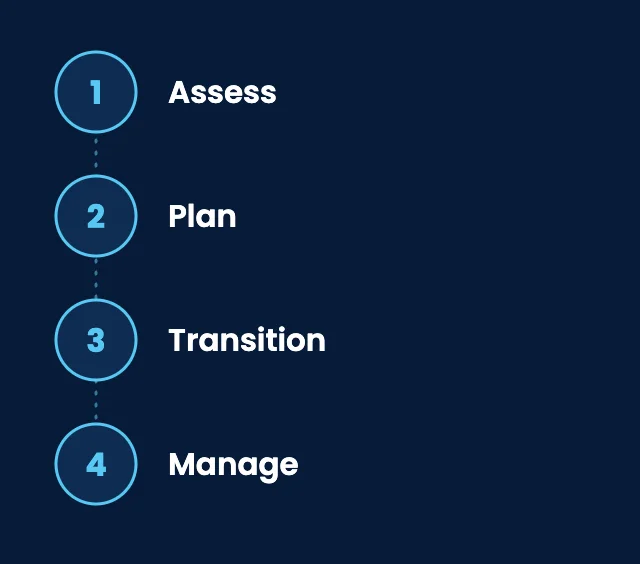
How switching to managed IT works
01
Assess
We learn your environment: devices, accounts, network, vendors, and the problems that keep coming up.
02
Plan
We agree on priorities, responsibilities, and the order of changes, so you know what will happen and when.
03
Transition
We make approved changes in phases with clear communication, to limit disruption to your team.
04
Manage
Ongoing support, monitoring, and patching, with recurring issues traced and fixed instead of patched again.
Client stories
What Los Angeles businesses say about our managed IT
Constant tech interruptions were wearing us down.
“It felt like something broke every week, and our team was constantly pulled away from their work to deal with it. SupportMax took that off our plate and gave us a process instead of constant firefighting.”
Milo Umberfield - Owner, Construction
They built a plan instead of just reacting.
“SupportMax didn't just fix what was broken—they put together a plan to prevent problems from happening in the first place. That proactive approach has made a real difference.”
Maren Quartzvale - Operations Director, Manufacturing
Technology finally works without daily chaos.
“We're no longer dealing with constant interruptions or wondering what's going to break next. Things just work, and that's taken a lot of stress off the team.”
Willa Westford - General Manager, Distribution

Working with SupportMax
One accountable team, clear next steps
Plain-English guidance for Los Angeles businesses
Tell us what's getting in the way. We'll review your setup, explain in plain English what we'd do first, and recommend a scope with a clear quote.
Office hours Monday to Friday, 9 a.m. to 6 p.m.
Onsite support on the Westside of Los Angeles
Call 310.331.8119
Is it a fit?
Who managed IT is a good fit for
Usually a strong fit
Businesses with roughly 1 to 100 employees
No full-time IT person, or one person stretched too thin
Recurring problems that never quite get solved
Several technology vendors and no one coordinating them
Teams that rely on email, cloud apps, and shared files every day
Maybe not the right fit
A single one-time project with no ongoing support needs
Organizations looking only for the lowest hourly rate
Not sure? A short consultation will tell you either way.
Options and pricing
Managed IT options and how pricing works
Three ways to work with SupportMax, depending on how much of your IT you want one team to own. Every option is quoted after a short assessment, because the right scope depends on your people, devices, and systems.
Option 1
SupportMax Stability
Custom scope & quote
Best for: Teams that mainly need reliable day-to-day support.
Intended outcome: Your people know where to go for help, and routine maintenance stops slipping.
Scope we start from
Remote help desk for your employees, Monday–Friday 9–6 PT (24/7 coverage available as an add-on)
Device monitoring, updates, and patching
Coordination with your internet, software, and phone vendors
A named point of contact and regular reviews of issues, risks, and priorities
Onsite help on the Westside of Los Angeles, billed per visit
Exact scope is confirmed after the assessment.
Option 2
SupportMax Secure
Custom scope & quote
Best for: Most small businesses handling client or financial data.
Intended outcome: Day-to-day IT handled, the main security gaps closed, and backups you can restore from.
Scope we start from
Everything in Stability
Onsite help on the Westside of Los Angeles when needed, included
Endpoint protection on every computer
Email filtering, MFA, and Microsoft 365 security settings
Managed backups with restore testing
Exact scope is confirmed after the assessment.
Option 3
SupportMax Complete
Custom scope & quote
Best for: Firms with insurance, client, or regulatory security requirements.
Intended outcome: Broader protection, trained staff, and help when something goes wrong.
Scope we start from
Everything in Secure
24/7 threat monitoring
Recurring vulnerability scans and fixes for what is found
Dark web monitoring for staff credentials
Firewall and network security management
Security awareness training and phishing simulations
Incident response help during business hours, included
Exact scope is confirmed after the assessment.
Cost factors
What affects the cost
Discussed separately in every option: hardware purchases, software and Microsoft 365 licenses, and one-time projects such as office moves or migrations. Your written proposal states whether each is included or quoted separately.
Users and devices
How many people need support, and how many computers, phones, and other devices are involved.
Locations and onsite needs
How many offices you have and how often problems need someone in person.
Security requirements
Industry obligations, insurance requirements, and the protection your data needs.
Systems and vendors
The applications, cloud services, and outside providers we'd support and coordinate.
Starting condition
How much cleanup or catch-up work is needed before day-to-day support settles in.
Level of involvement
Whether SupportMax handles IT fully or supports specific parts of your environment.
Questions
Managed IT services: Los Angeles FAQs
Have a question that isn't here? Call 310.331.8119 or schedule a free consultation.
What do managed IT services include?
With SupportMax, managed IT includes a remote help desk for your employees, onsite support on the Westside of Los Angeles when needed, proactive device monitoring and patching, and vendor management on your behalf. The exact scope is agreed for your business before we start. Related services include IT help desk support, remote IT support, onsite IT support, network management, Microsoft 365 management, cloud services, cloud migration, and backup and disaster recovery. Thinking about handing off all of your IT? See IT outsourcing services.
How is managed IT different from break-fix support?
Break-fix means you call someone after something stops working. Managed IT means one team takes ongoing responsibility: keeping devices maintained, tracking recurring problems to their cause, and coordinating your vendors.
Do you provide onsite support?
Yes. Most issues are handled remotely so your team can keep working, and SupportMax provides onsite support on the Westside of Los Angeles when a problem needs someone in person.
How much do managed IT services cost?
It depends on your users and devices, locations, security requirements, systems, and starting condition. There are three packages (SupportMax Stability, SupportMax Secure, and SupportMax Complete), and each one is quoted after a short assessment based on your actual environment. We don't publish fixed prices.
What does switching to SupportMax look like?
We assess your environment, agree on a plan and responsibilities, then transition in phases with clear communication to limit disruption. After that, ongoing support and maintenance take over. See how switching to SupportMax works, step by step. For longer-term planning and budgeting, add vCIO services.
Will you work with our existing vendors?
Yes. Coordinating with your internet provider, software vendors, and other technology providers is part of the service, so your team doesn't have to.
Let's take IT off your plate
Tell us what's been getting in the way. We'll talk through your setup and whether managed IT is the right fit, in plain English.
Prefer to call? 310.331.8119 · Mon–Fri, 9–6