
Cybersecurity · Zero trust application control
Zero Trust Application Control: Stop Unapproved Software Before It Runs
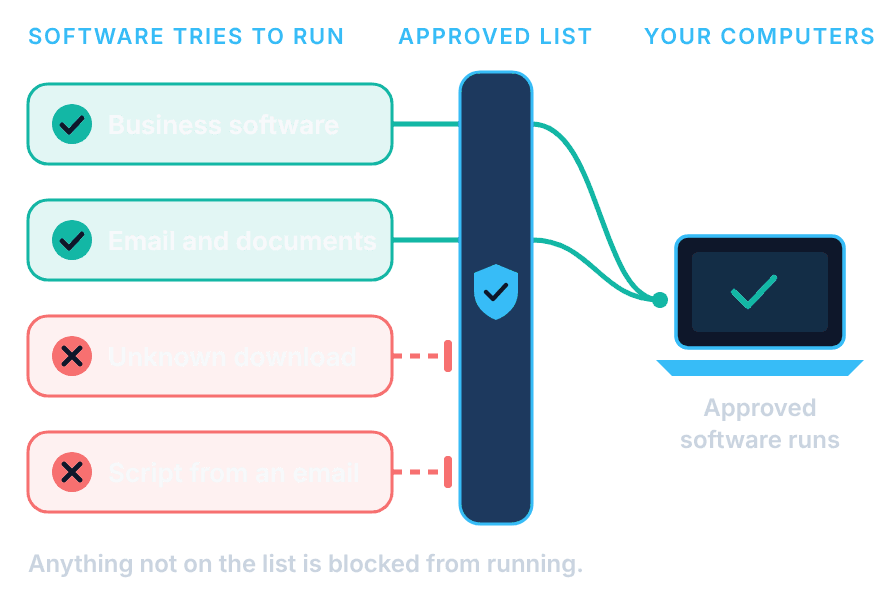
Zero trust application control, also called application allowlisting, flips the usual approach to security. Instead of trying to spot and block every bad program, only the software your business has approved is allowed to run. Unknown programs, risky scripts, and most ransomware simply don't start. SupportMax sets it up on your computers, manages the approved list, and handles requests for new software so your team keeps working.
Cybersecurity · Based in West Los Angeles
How it protects you
Questions? 310.331.8119 · Mon–Fri, 9–6 Pacific.
Plain-English guidance
Based in West Los Angeles
Default deny, done carefully
One accountable team
Why it matters
Why antivirus alone isn't enough
Traditional security tries to recognize bad software. New threats often aren't recognized yet.
01
New ransomware
Brand-new ransomware may not be on any blocklist when it reaches your computers.
02
Risky scripts
Attackers use scripts and built-in tools that look normal to antivirus.
03
Unapproved downloads
Staff install free tools and browser add-ons nobody has reviewed.
04
Too much trust
By default, any program a user opens can reach everything that user can: files, email and shared drives.
05
Malware built with AI tools
AI tools make new malware quicker to create than security lists can keep up with. Blocking unknown software doesn't depend on recognizing it first.
How it works
How zero trust application control works with SupportMax
Learn, lock down, manage.
Ask About Application Control
1. Learn
We install the allowlisting software and record which programs your team actually uses.
2. Lock down
We build the approved list and switch to blocking anything that isn't on it.
3. Manage
We review requests for new software and keep policies current as your business changes.
How it compares
Allowlisting, antivirus, and how approvals work
Different tools with different jobs.

Allowlisting
Default deny
Only approved software runs
Unknown programs blocked
Scripts and ransomware stopped
Works with new threats

Antivirus
Default allow
Blocks known bad software
Needs updates to spot threats
Can miss brand-new attacks
Still useful alongside allowlisting

Approvals
Day to day
Staff request new software
We review the request
Approved software is added
Policies stay current
NIST's Guide to Application Whitelisting (SP 800-167) explains how application allowlisting works, and CISA's #StopRansomware guide recommends controlling which applications can run as part of ransomware prevention.
Beyond allowlisting
More zero trust controls, managed by the same team
Allowlisting decides what can run. These controls limit what approved software, people and devices can do once they are in. We recommend them based on your risks, not as a bundle.
Containment
Limit what approved apps can do
Trusted programs such as Office, PDF readers and PowerShell get only the access they need. If an attacker tricks one into misbehaving, it can't freely reach your files, the internet or other programs.
Admin rights
Remove everyday admin rights
Your team works without administrator access, so one bad click can't install software or change security settings. When a specific program genuinely needs admin rights, we approve it for that program only.
Data control
Control USB drives and file access
Decide which USB drives and external storage can connect, and whether files can be copied to them. Set who can open or change sensitive folders, network shares and cloud storage, so data doesn't leave by accident or on purpose.
Cloud access
Tie cloud sign-ins to approved devices
Microsoft 365 and other cloud apps can be set to open only from your approved computers. A stolen password or session token alone isn't enough to sign in from someone else's device. It works alongside MFA, not instead of it.
Remote staff need secure access too. Our SASE and zero trust VPN replacement service gives them app-by-app access instead of a traditional VPN. No single control stops every attack; these work together with endpoint security, MFA and tested backups.
Working day to day
Secure without slowing your team
Application control only works if people can still get their jobs done. That is why we start by learning what your team already uses, and why new software requests are reviewed rather than ignored. It works alongside your other protection, not instead of it. See ransomware protection and endpoint security.
Endpoint security →What's included
Zero trust application control from SupportMax
01
Deployment
Allowlisting software installed and configured on your computers.
02
Approved list
A list of approved software built from what your team actually uses.
03
Blocking
Unapproved applications, scripts, and ransomware blocked from running.
04
Policy management
New software requests reviewed and policies kept up to date.
Client stories
What clients say about application control from SupportMax
We wanted to stop unapproved software from running.
“We knew unapproved software was a risk but had no way to control it. SupportMax put controls in place that actually work.”
Felix Lindenstone - CISO, Financial Services
They implemented controls without disrupting work.
“SupportMax rolled out application controls that stop unapproved software while letting approved tools work normally. Our team barely noticed.”
Avery Meadowbrook - IT Director, Manufacturing
We control what runs on our endpoints now.
“We no longer worry about what employees might install or run. SupportMax gave us proper control without the friction.”
Grace Ravenstone - IT Manager, Professional Services
Options and pricing
Application control or managed zero trust?
Two levels of help. Application Control sets up allowlisting on your computers. Managed Zero Trust adds ongoing policy management and software approvals. Both are quoted after an assessment.
Option 1
Application Control
Custom scope & quote
Best for: Businesses that want allowlisting deployed and an approved list built for them.
Intended outcome: Only approved software runs on your computers.
Scope we start from
Allowlisting software deployed and configured
Approved list built from what your team uses
Unapproved applications and scripts blocked
Exact scope is confirmed in your written quote.
Option 2
Managed Zero Trust
Custom scope & quote
Best for: Businesses that want SupportMax to keep the approved list and policies current.
Intended outcome: Application control that keeps working as your business changes.
Scope we start from
Everything in Application Control
Review and approval of new software requests
Ongoing policy management
Exact scope is confirmed in your written quote.
Cost factors
What affects the cost
Neither option includes published response times or prices; scope and terms are agreed with you and written into your proposal. Software licenses and other security services are discussed separately. No single tool stops every attack.
Number of computers
How many computers and servers need application control.
Software in use
How many different programs your team relies on.
Approval volume
How often staff need new software approved.
Other protection
Whether endpoint security, MFA, and backups are part of the same plan.
Working with SupportMax
One accountable team, clear next steps
Interested in application control?
Let's talk about whether it fits your business. Call 310.331.8119, Monday–Friday, 9:00 a.m.–6:00 p.m. Pacific.
Questions
Application control: common questions
Have a question that isn't here? Call 310.331.8119 or schedule a free consultation.
What is application allowlisting?
A security approach where only approved software is allowed to run on your computers. Everything else is blocked by default.
Does it stop ransomware?
It blocks most ransomware from running because the ransomware isn't on the approved list. No single tool stops every attack, so it works alongside other protection.
Will it get in my team's way?
We start by learning what your team uses, so everyday work continues. New software is requested and reviewed instead of installed freely.
Does it replace antivirus?
No. They do different jobs, and using both gives stronger protection.
What happens when someone needs new software?
They request it, we review it, and approved software is added to the list.
How is application control priced?
It depends on the number of computers and whether you want deployment only or ongoing policy management. Exact scope is confirmed in your written quote.
Stop unapproved software before it runs
Call 310.331.8119, Monday–Friday, 9:00 a.m.–6:00 p.m. Pacific, to talk about application control. See also cybersecurity services.
Prefer to call? 310.331.8119 · Mon–Fri, 9–6